
Gherkin PowerTools: Workspace Intelligence for Python Behave
Visual execution, AST-powered linting, and real-time impact analysis for enterprise BDD teams.
A premium VS Code testing environment that transforms plain-text Gherkin specifications into an interactive, debuggable, and strictly validated codebase.



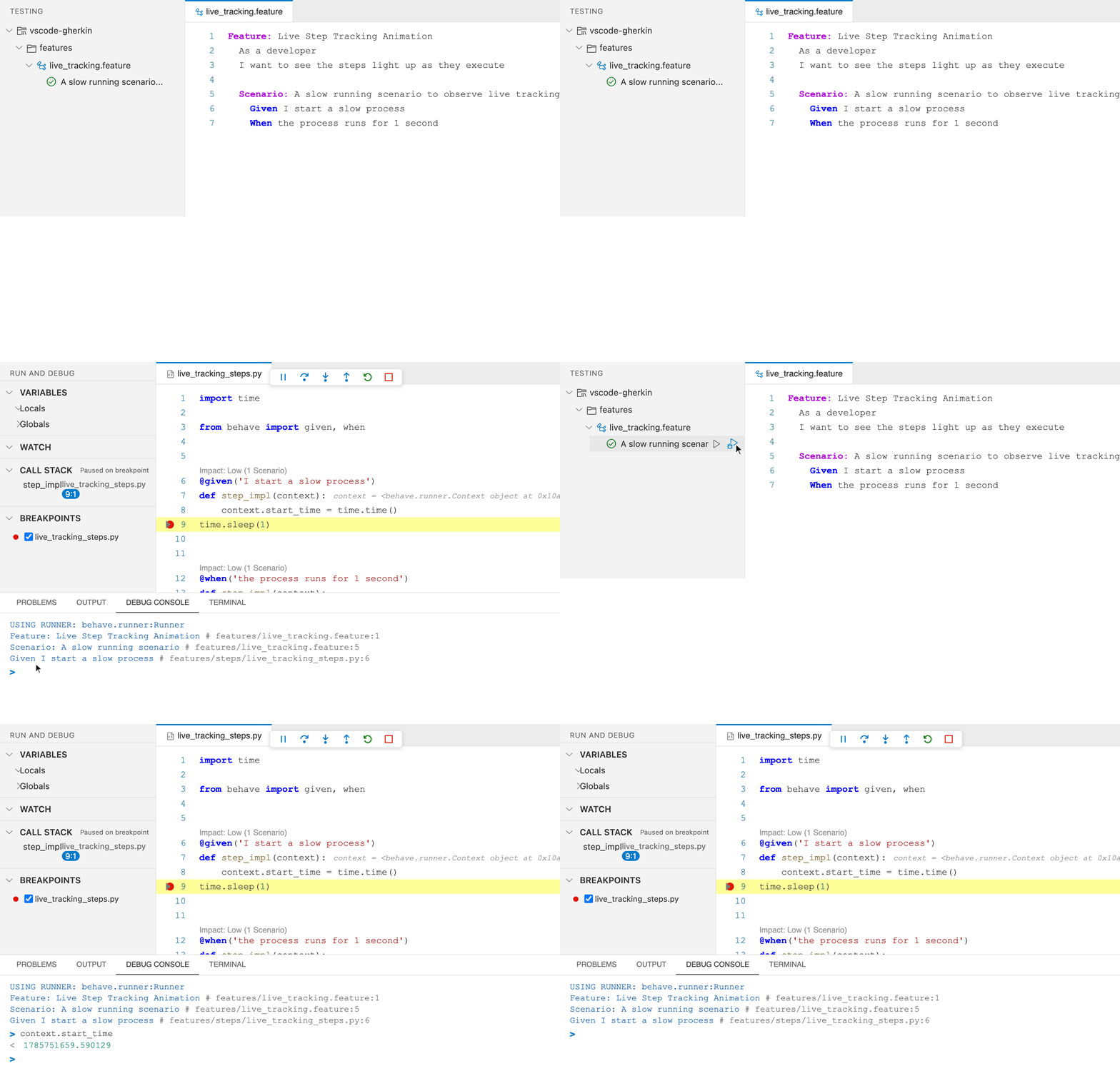
Visually run, debug, and track your Python Behave scenarios directly from the VS Code Test Explorer.
⚡ Quick Start
- Install from the VS Code Marketplace.
- Open any
.featurefile to rapidly activate formatting and linting. - (Behave only) Gherkin PowerTools automatically discovers your project and offers a guided Walkthrough.
Why Gherkin PowerTools?
A premium testing environment that eliminates the friction between plain-text .feature files and your Python backend logic:
- Visual Testing Integration: Run, debug, and trace Python Behave scenarios visually directly from the VS Code sidebar.
- Workspace Intelligence: Context-aware IntelliSense and Cmd+Click navigation with O(1) in-memory indexing.
- Impact-Aware Safe Refactoring: Natively rename steps across your entire workspace (F2) and receive automatic alerts when the blast radius is large before committing the change.
- Catch Errors Before CI: Dialect-aware real-time AST linting catches malformed syntax as you type.
🌟 Feature Highlights
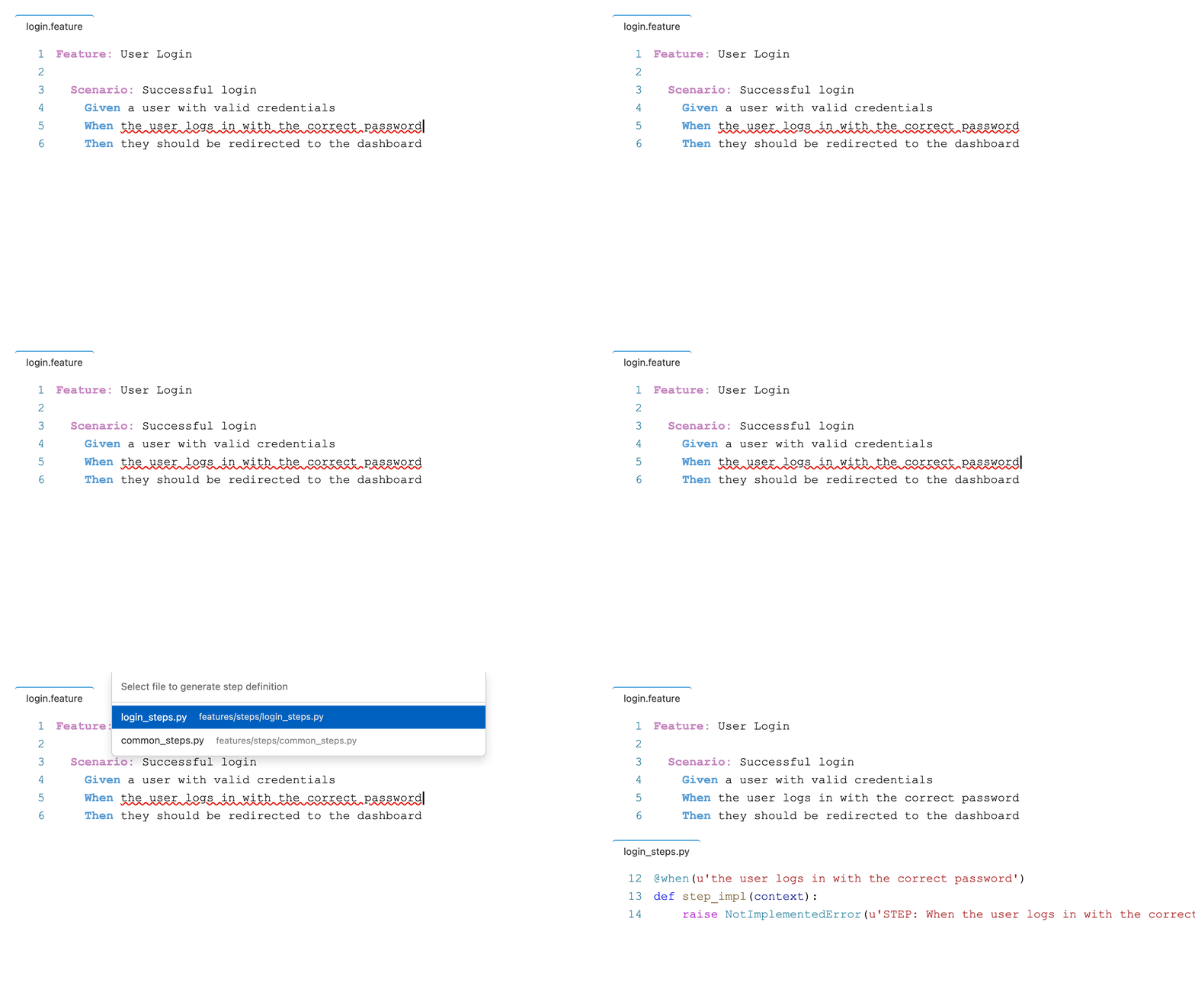
1. Missing Python Step Generation
Press Ctrl+. (Cmd+. on macOS) to instantly generate a valid Python stub—complete with extracted regex parameters—from any undefined Gherkin step.
- Workspace-Aware: Intelligently infers the optimal destination based on your stepGlobs configuration, resolving ambiguity safely via QuickPick.
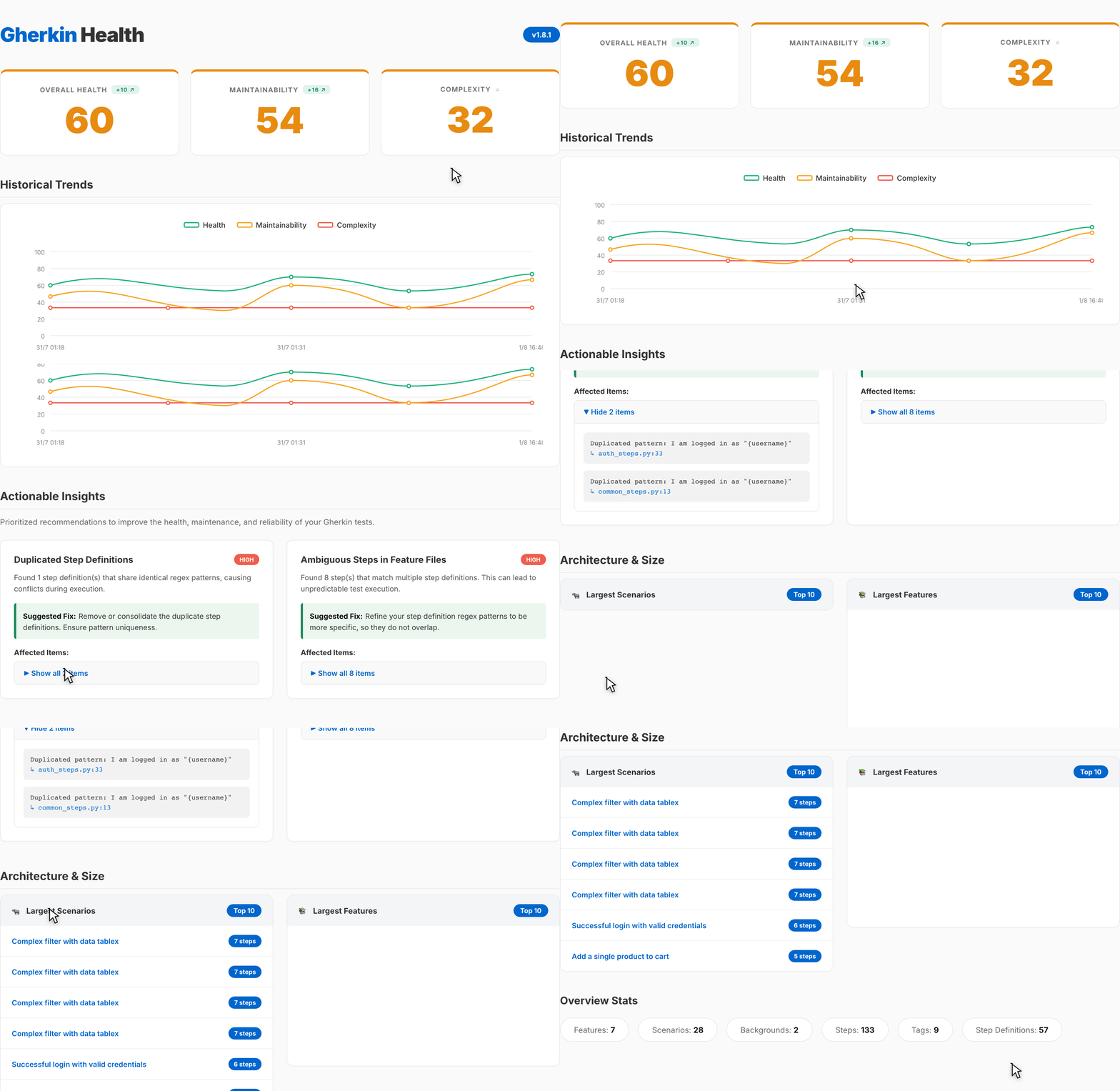
2. Gherkin Health Dashboard & Anti-pattern Engine
Powered by the new BDD Anti-pattern Detection Engine, you can now visually identify unused, duplicated, ambiguous, or highly complex step definitions and scenarios. Gherkin PowerTools calculates Technical Debt and Maintainability, persisting branch-isolated historical snapshots to securely visualize your project's evolution over time in a premium, interactive dashboard.
- Finding Suppression: Safely suppress deliberate anti-patterns using Quick Fixes, with all suppressions persisted to a centralized ledger (.gherkin-pt-suppressions.json).
- Batch Fix Workflow: Run the Fix All Safe Auto-Fixable Problems command to automatically correct semantics-preserving errors across a whole document.
3. Real-Time Impact Analysis
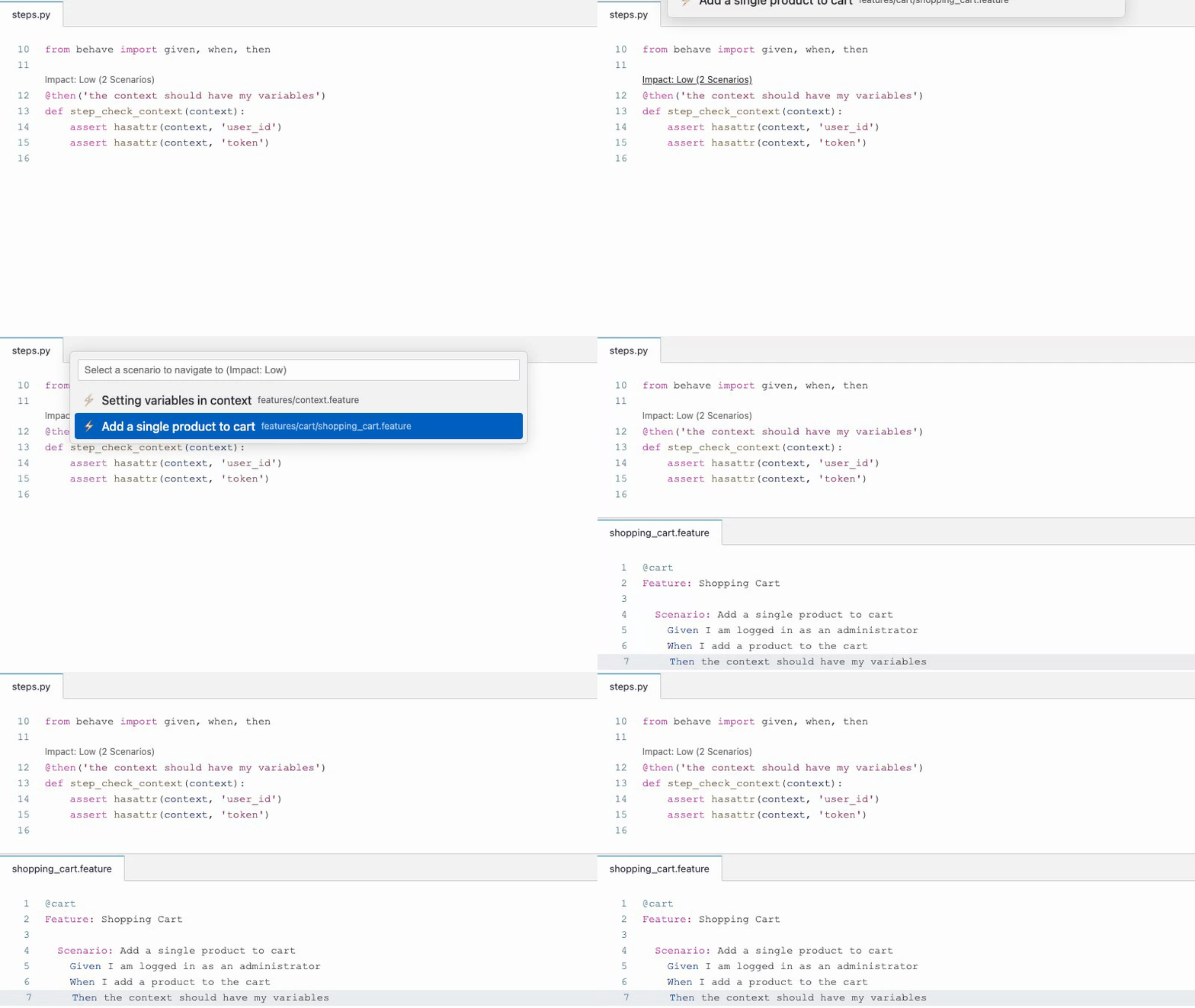
A Blast Radius CodeLens appears above every Python step definition. View exactly how many scenarios will be impacted before refactoring, or instantly see if a step is involved in multiple colliding matchers (Impact: Ambiguous). Click the CodeLens to jump directly to the affected scenarios.
🛠 Capabilities
Gherkin PowerTools acts in two tiers depending on your project:
Generic BDD Frameworks (Cucumber, SpecFlow, Playwright)
- AST-Powered Formatting: Rapidly align tables, tags, and indentation (
Shift+Alt+For Editor Context Menu), including automatic formatting for embedded JSON DocStrings. - Structural Linting: Catch malformed scenarios across 70+ spoken languages in real-time, completely ignoring invalid text inside Gherkin DocStrings (
"""). - Find All References: Instantly locate all usages of a Gherkin step across your entire workspace (Shift+F12 or Context Menu).
- Document Outline: Navigate complex
.featurestructures from the VS Code sidebar. - Gherkin Health Dashboard: Interactive modern webview to analyze oversized features, tag usage, and architectural anti-patterns with built-in DOM node limits for massive workspaces.
Exclusive to Python Behave
- Context-Aware IntelliSense: Autocomplete powered by a robust transactional snapshot model, deterministic Step Definition Identity, recent-usage ranking, tag affinity, clean ambiguity grouping, robust regex snippet extraction, and precise AST-based parameter extraction for Scenario Outlines to perfectly match step templates with Example table headers.
- Find All References: Natively find all feature files using a specific Python
@stepdecorator directly from your Python code (Shift+F12 or Context Menu). - Step Refactoring: Safely extract steps or natively rename them across your entire workspace (F2 or Context Menu), featuring progressive disclosure that triggers VS Code's Refactor Preview pane for high-impact renames.
- Test Explorer Integration: Run and debug features with line-by-line execution tracking, pristine Markdown-formatted error traces, and an automated Focus Mode that illuminates the active scenario in the editor. You can also re-run failed scenarios directly from their exception trace nodes.
- BDD Anti-pattern Detection Engine: Instant technical debt diagnostics for unused, ambiguous, or duplicated step definitions. Features Object-based Configuration to dynamically scale heuristic severities (e.g. adjust max sizes per rule).
- Standalone CLI (
@carlos-camara/gherkin-pt): Enforce formatting, run the Anti-pattern Engine, and calculate project health metrics natively in your CI/CD pipelines. The CLI uses the exact same parsing, formatting, and BDD Anti-pattern engine as the VS Code extension. View the Capability Contract. (Note: In Remote Development environments like WSL or SSH, run the CLI from the VS Code Integrated Terminal, not your local OS terminal).
⚙️ Essential Configuration
Share team formatting and diagnostic rules by committing a .gherkin-powertoolsrc.json to your project root.
| Setting | Default | Description |
|---|---|---|
gherkinPowerTools.profile |
"custom" |
Formatting baseline: strict, team, minimal, legacy, or custom. |
gherkinPowerTools.rules |
{...} |
Diagnostic rule overrides. Accepts string severities ("error") or configuration objects ({ "severity": "warning", "maxSteps": 20 }). |
gherkinPowerTools.behave.stepGlobs |
["**/steps/**/*.py", ...] |
Paths to Python step definitions. |
gherkinPowerTools.behave.execution |
{"executable": "behave", "arguments": []} |
Secure Test Explorer execution command (e.g., {"executable": "poetry", "arguments": ["run", "behave"]}). |
gherkinPowerTools.behave.localExecutable |
None | Machine-specific override for the Behave executable absolute path. |
Visit the Configuration Reference for all available settings.
Support & Contributions
Contributions are welcome! Please read the Contributing Guide.
Enjoying Gherkin PowerTools? Leave a rating on the Marketplace! ⭐⭐⭐⭐⭐