Gherkin Editing
Gherkin PowerTools provides a powerful suite of editing features that work out of the box for any Gherkin-based project (Cucumber, SpecFlow, Behave, Playwright BDD, Karate, etc.).
Formatting
The built-in formatter is powered by the official @cucumber/gherkin AST, ensuring that your code is formatted safely and standardizes whitespace across your entire team.
Triggering the Formatter
You can format the entire document or just a selection: - Format Document: Shift+Alt+F (Shift+Option+F on macOS) - Format Selection: Ctrl+K Ctrl+F (Cmd+K Cmd+F on macOS)
Formatter Behavior
- Idempotence & Range Formatting: The formatter is 100% idempotent. When formatting a specific selection (Range Formatting), the extension employs a Safe-Unit Grouping Model to minimize formatting blast radius. Instead of unexpectedly expanding to format an entire Scenario, it groups contiguous structural elements (e.g., data tables, doc strings, tag blocks) into safe, atomic units. It only expands your selection to the nearest safe boundaries, ensuring editing two steps doesn't inadvertently format the rest of the document.
- Syntax Error Handling: The formatter requires a valid Gherkin AST. If your document contains syntax errors (like a missing colon on a
Scenario), automatic formatting (like Format on Save) will be completely silent to prevent intrusive toast warnings from interrupting your typing flow. If you trigger the Format Document command explicitly via the Command Palette or keyboard shortcut, you will receive a single concise actionable warning. - Tables: Data Tables and Examples are dynamically aligned to the preceding step text (by default) to keep everything visually clean.
- Doc Strings: Content inside
"""doc strings is dynamically padded to align with the step keyword (or preserved exactly, based on configuration). - JSON Formatting: If your DocString contains valid JSON, the formatter will automatically parse, align, and format the JSON payload natively. This can be configured or disabled via
gherkinPowerTools.docStrings.formatJson. - Tags: Long lines of tags are intelligently wrapped or can be kept on a single line depending on your settings.
- Comments: Comments are preserved and aligned properly.
- Blank Lines: Standardizes blank lines between Scenarios, Rules, and Backgrounds.
See the Configuration section for adjusting spacing, table alignment, and tag wrapping.
Diagnostics and Linter
The real-time AST linter validates your Gherkin structure as you type. It gracefully handles incomplete documents and only reports actionable errors.
Structural Diagnostics
- Missing Colons: Ensures
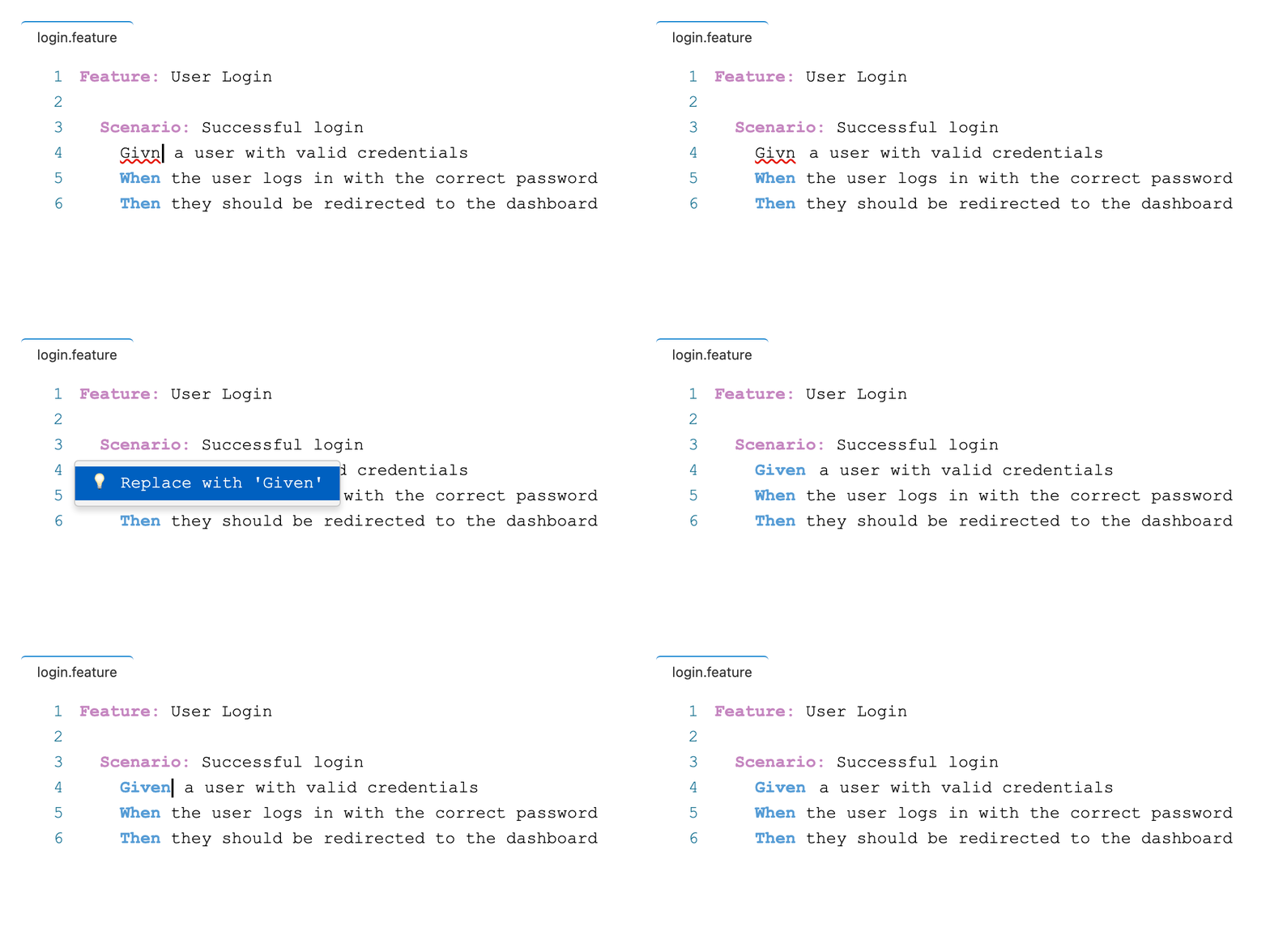
Feature:,Scenario:,Background:, etc., have their required trailing colon. - Invalid Keywords: Detects misspelled Gherkin keywords using Levenshtein distance matching for your specific dialect (short words require an exact match to prevent false positives). (The linter intelligently ignores all text inside
"""DocStrings, preventing false-positive keyword flags on code snippets or JSON data). - Semantic Errors: Validates nesting (e.g., placing an
Examples:block inside a plainScenarioinstead of aScenario Outline). - Table Inconsistency: Detects unclosed
|pipes and inconsistent column counts across rows.
Note: For Python Behave projects, the linter also provides warnings for Undefined and Ambiguous steps. See Python Behave.
Quick Fixes
For common structural errors (like a missing colon or misspelled keyword), place your cursor anywhere on the line with the underlined text and press Ctrl+. (Cmd+. on macOS) or click the lightbulb to apply a Quick Fix.
Batch Quick Fixes
Run the Gherkin PowerTools: Fix All Safe Auto-Fixable Problems command to automatically correct all non-overlapping, deterministic (semantics-preserving) Quick Fixes across the entire active document without breaking undo history.
Navigation and UI
Syntax Highlighting
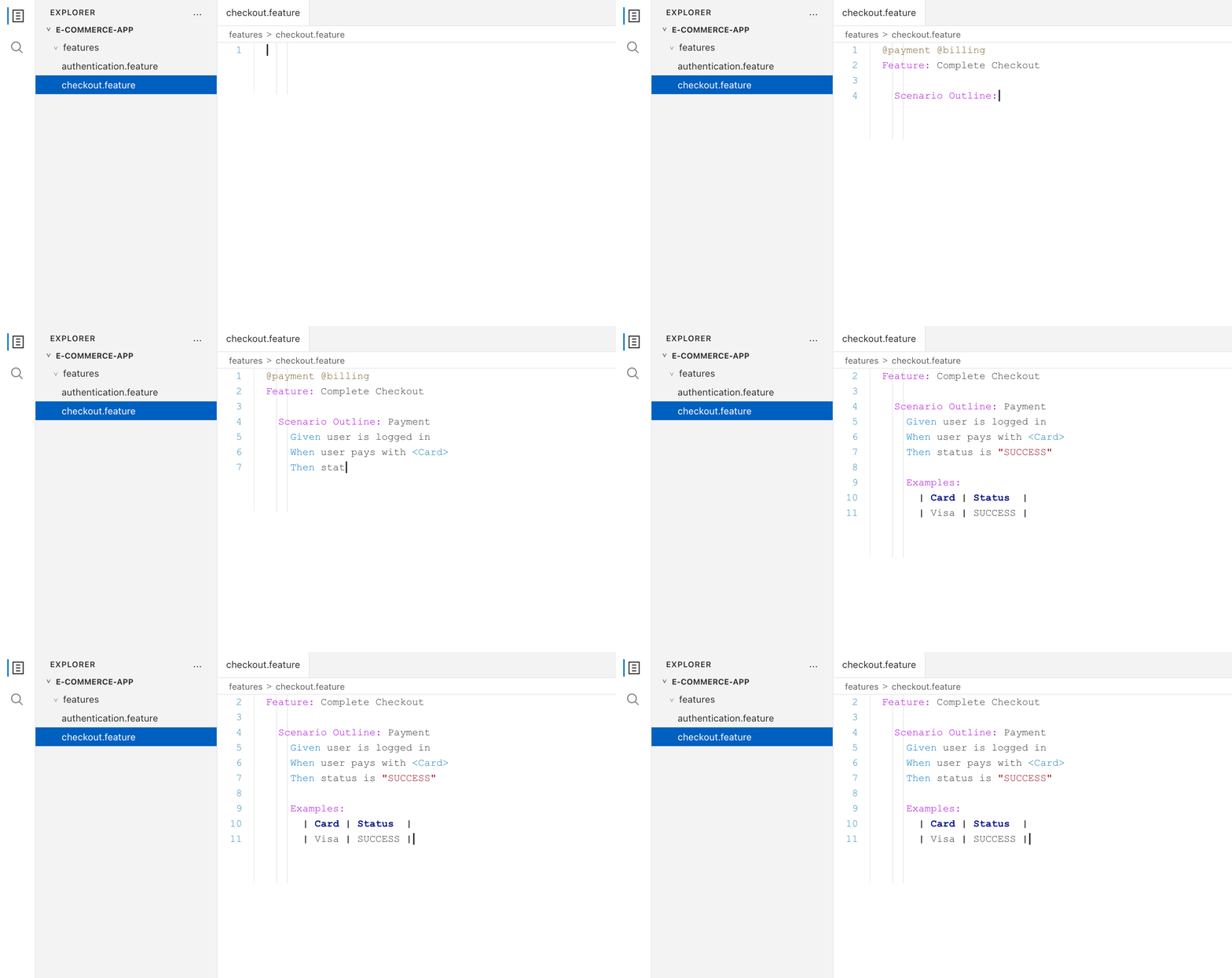
Gherkin PowerTools provides curated semantic syntax coloring that works cleanly on any VS Code theme (Dark or Light), highlighting keywords, tags, parameters, and table cells appropriately.
Document Outline
The extension natively integrates with VS Code's Outline view and Breadcrumbs.
- You can navigate large .feature files easily by clicking on scenarios or rules in the sidebar.
- Outline nodes update in real-time as you type, and include the tags associated with each block for easier visual filtering.
Find All References
When using Python Behave, placing your cursor on a Gherkin step and pressing Shift+F12 (or selecting Find All References from the right-click menu) will instantly resolve all other usages of that step across your entire workspace. It will also link back to the Python @step decorator that implements it.
Impact-Aware Step Rename
You can natively rename Gherkin steps across your entire workspace by pressing F2 (or Rename Symbol from the context menu) on any step. Gherkin PowerTools features progressive disclosure: if the blast radius of your rename is small, it applies instantly. If the rename is "high impact" (affecting multiple files or many scenarios), it safely triggers VS Code's native Refactor Preview pane, allowing you to manually review all exact changes before committing them.
AST-Based Parameter Completion
When authoring Scenario Outline steps, typing < automatically triggers IntelliSense populated with the headers from your Data Tables. This engine uses the core AST instead of basic regex, meaning it natively understands escaped pipes (\|), automatically merges multiple Examples tables in the same scenario, and prevents autocomplete suggestions from bleeding over into adjacent scenarios.
During mid-flight typing where the syntax tree is temporarily broken, it uses an instantaneous, constrained regex fallback to guarantee fluid keystroke responses.
Breadcrumbs
VS Code’s breadcrumb navigation at the top of the editor is fully populated, allowing you to quickly jump between scenarios in large files.
Dialect Support
The extension supports over 70+ Gherkin dialects (e.g., Spanish, French, German). Use the # language: es header at the top of your .feature file to enable localized linting and formatting.